Showing posts with label Updates. Show all posts

Saturday, January 11, 2014

Tuesday, December 24, 2013

Parcel Net Revised Version 23.12.2013 by CEPT


DATE                               SIZE       PERTICULARS

12/09/2013 05:07PM         39,719 Guidelines For Parcel Booking Offices.docx
12/23/2013 09:06PM     32,886,981 PostOffices.rar
12/09/2013 09:25AM      1,024,479 Release Document.docx
12/23/2013 09:05PM     13,167,336 RMSOffices.rar
12/23/2013 09:06PM     42,728,895 SolutionsToParcelNetUpdate.rar

Friday, December 20, 2013

SPEEDNET 4.1.1 Released by CEPT

Index of /SpeedNet/speednet4.1.1/

NameSizeDate Modified
[parent directory]
Collection_Agent_Setup/12/19/13 2:41:00 PM
Documents/12/19/13 2:41:00 PM
SpeedOne Installer.exe24.8 MB12/7/13 9:07:00 PM
SpeedOne Updater.exe5.8 MB12/6/13 10:50:00 AM
Utilities/12/19/13 2:41:00 PM

Monday, December 16, 2013

MM Updates-9 dated 10.12.13 by SRFIX

MM Updates-9 dated 10.12.13

 This includes EXL files and updates dated 10.12.13

https://googledrive.com/host/0B9bgr2DVPLD8elJlZGpfLVh0S1k

Friday, December 13, 2013

Tuesday, December 10, 2013

MM One Updater for MM7 Update 9 by PoTools

Version : MM One Updater v2.0.1
Developed by : Admin , PoTools
Developed for : Only for Post Office Update
 
Script executor
  1. Auto script Executor - Enter Server name at Once.
  2. No need to open Script tool for update each exl.
Software Updater
  1. Update Latest exe replaced automatically.
  2. No need to select Installation path.
  3. All updated dlls were registered automatically

DOWNLOAD

Sunday, December 8, 2013

MM Updater with Script Executor


Step 1:
Double click Updater.Exe
By default Server will be selected. Click OK
Step2:
This will execute SRScript.Exe provided with Updater.
( This is based on the concept created by POTools )
Provide your Server name and press Enter. Then press any Key.

The Exl file will be executed through Meghdoot Script Tool. When execution completed, close the Script Tool. Press any key to execute next Exl file. For each file you have to press a key. This is made intentionally to confirm you which file is executed. At the end you can confirm all script files are executed.


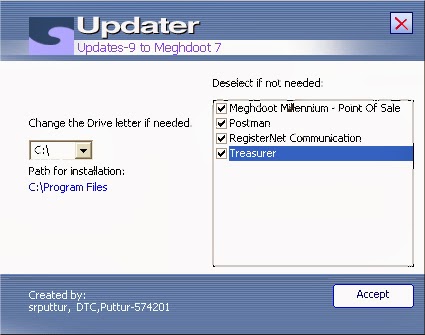
Step3: Then select Client and click OK. The Updater window appears. Change the Drive letter as per your installation folder and deselect the components not needed if any for updating.

Click Accept.

The message confirms successful updation.

All the updates and exl files available till 08.12.13  are incorporated in this upload. However,you are requested to check PTC ftp site and follow instructions received from your DO.

https://googledrive.com/host/0B9bgr2DVPLD8elJlZGpfLVh0S1k/Updates9.zip
Send your feedback to: srputtur@gmail.com
courtesy:http://srfix.blogspot.in
Related Posts Plugin for WordPress, Blogger...